
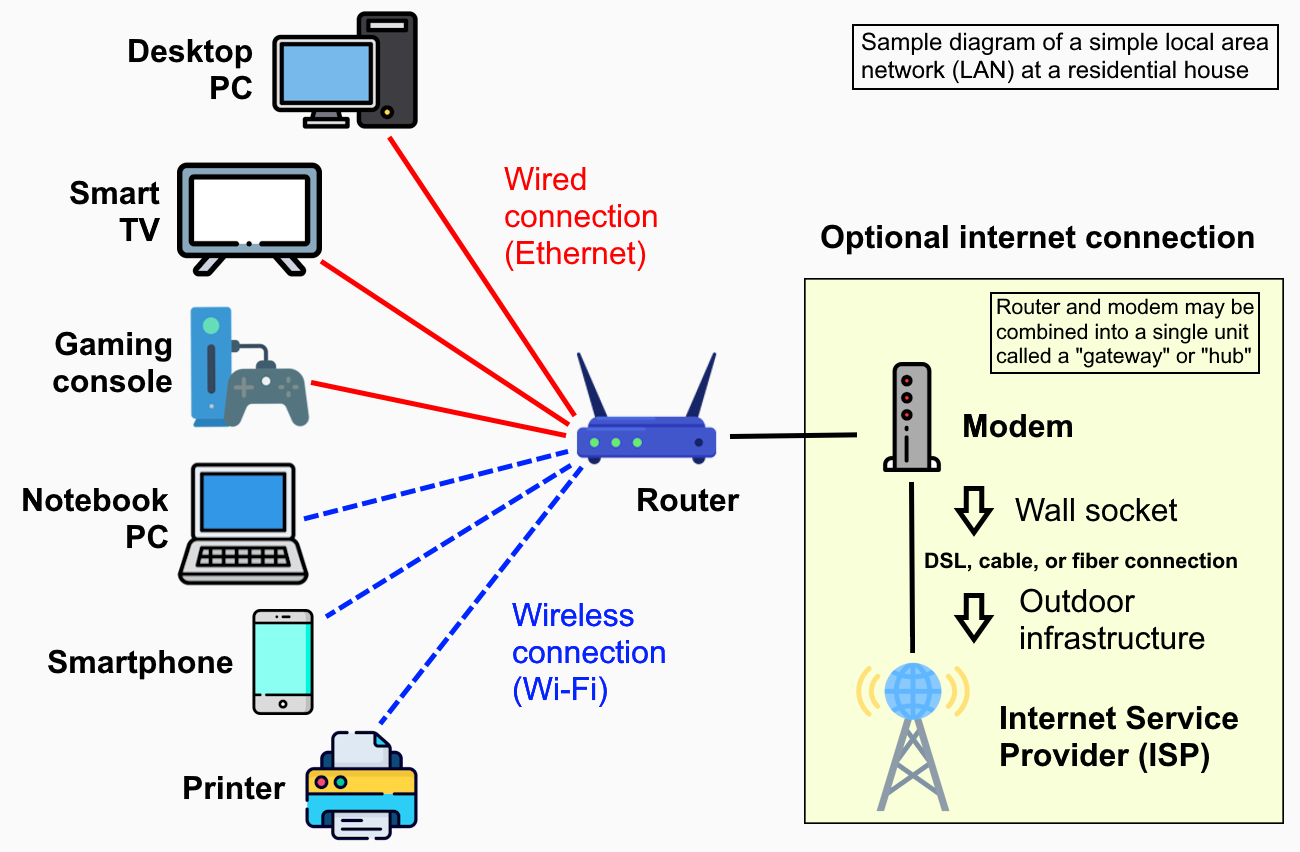
Modern homes in Dubai, Abu Dhabi, and across the UAE are packed with connected devices — smart TVs, security cameras, laptops, tablets, gaming consoles, smart speakers, and more. Yet most home networks are still set up the same way they were a decade ago: one router, one password, everything on the same connection. That approach works until it doesn't, and when it fails, the whole household feels it. A properly planned home network gives every device the bandwidth it needs, keeps your personal data separated from guest or smart-home devices, and makes troubleshooting far easier when something goes wrong.
Start With a Clear Picture of What You Have
Before you touch a single cable or log in to a router, take stock of every device in your home that connects to the internet. Most households are surprised by how many they find. Write them down and group them into rough categories:
- Work devices — laptops, desktop PCs, work phones, VPN connections
- Entertainment — smart TVs, streaming sticks, gaming consoles, sound systems
- Smart-home devices — smart bulbs, thermostats, video doorbells, robot vacuums
- Security — IP cameras, NVRs, smart locks
- Guests — visitors' phones and laptops
This inventory tells you two things: how much bandwidth you realistically need and how many separate network segments make sense for your household. It also reveals devices you may have forgotten about — older gadgets that sit quietly on your network and rarely get security updates.
Choose the Right Equipment for Your Home's Size
A single router is fine for a small apartment. For a villa or a larger flat in Sharjah or Abu Dhabi with thick concrete walls, you will almost certainly need a mesh Wi-Fi system or at minimum a router paired with one or two access points. Concrete and plasterboard are very common in UAE construction, and they absorb Wi-Fi signals aggressively.
When selecting equipment, look for:
- Wi-Fi 6 (802.11ax) support — handles many simultaneous devices more efficiently than older standards
- Dual or tri-band radios — lets you separate traffic across different frequency bands
- VLAN or network-segmentation support — essential if you want to isolate smart-home devices from your work laptop
- A proper management app or web interface — you need to be able to see what is connected and adjust settings without calling a technician every time
Avoid very cheap, no-name routers. They often lack security patches after the first year and offer limited control over your network settings. Mid-range models from established brands give you a much better long-term experience.
Segment Your Network Into Separate VLANs or SSIDs
This is the single biggest improvement most home users can make. Instead of putting every device on one network, split them up. At a minimum, aim for three separate networks:
Main Network
Your laptops, phones, and tablets — devices you actively use and trust. Use a strong, unique password and keep it private.
Smart-Home or IoT Network
Smart bulbs, thermostats, cameras, and similar devices. These gadgets often have weaker security and infrequent firmware updates. Keeping them on their own network means a compromised smart bulb cannot reach your laptop or NAS drive.
Guest Network
Visitors get internet access without ever touching your main network. A guest network should be completely isolated — guests cannot see shared printers, file servers, or other devices on your private segments.
Most modern routers allow you to create multiple SSIDs (network names) with a few clicks in the management interface. If your router supports VLANs, you can go a step further and enforce stricter separation at the hardware level.
Sort Out Your Cabling Before Relying Entirely on Wi-Fi
Wi-Fi is convenient, but a wired Ethernet connection is always faster, more stable, and lower latency. For devices that stay in one place — desktop PCs, smart TVs, gaming consoles, NVRs — a short Cat6 cable will outperform even the best Wi-Fi setup.
If your home was not pre-wired for Ethernet (very common in older UAE apartments and villas), running even a few key cables can make a noticeable difference. Rigit's technicians regularly carry out tidy, concealed cabling runs in homes across Dubai and Sharjah, routing cables through trunking or walls so there are no trailing cables on the floor.
A small unmanaged switch in the living room or study lets you connect multiple wired devices from a single Ethernet run, reducing the number of cables you need to route back to your router.
Secure Your Network From Day One
Home network security does not need to be complicated, but a few basics are non-negotiable:
- Change the router's default admin username and password immediately. Default credentials are publicly listed and are one of the first things an attacker will try.
- Use WPA3 encryption if your devices support it. WPA2 is still acceptable; WEP is not — disable it entirely.
- Disable remote management unless you have a specific reason to use it. Most home users do not need to access their router from outside the home.
- Keep router firmware updated. Manufacturers release patches for known vulnerabilities. Check for updates every few months or enable automatic updates if your router supports them.
- Turn off WPS (Wi-Fi Protected Setup). It is convenient but has well-known security weaknesses.
Test, Label, and Document Your Setup
Once everything is running, take fifteen minutes to document what you have set up. Note down each network name, which devices belong to which segment, and where your router and any access points are physically located. Store this somewhere safe — a notes app, a printed sheet in a drawer, or a shared family document.
Label your cables if you have more than a handful. Use a free app like Fing to scan each network segment and confirm only the devices you expect are connected. Run a speed test on both wired and wireless connections so you have a baseline to compare against if performance drops in the future.
This documentation saves hours when something goes wrong six months down the line, and it is invaluable if a technician ever needs to help you remotely.
Conclusion
A well-organised home network is not a luxury — it is the foundation for everything else in a connected household. Taking the time to plan your segments, choose the right hardware, and secure your setup properly will save you frustration and protect your devices for years to come. If you are not sure where to start, or if your current setup has grown into a tangle of devices and weak spots, Rigit's home IT team is ready to help. We work across Dubai, Abu Dhabi, Sharjah, and Ajman — get in touch and we will get your home network running exactly as it should.